
Extrude Challenges
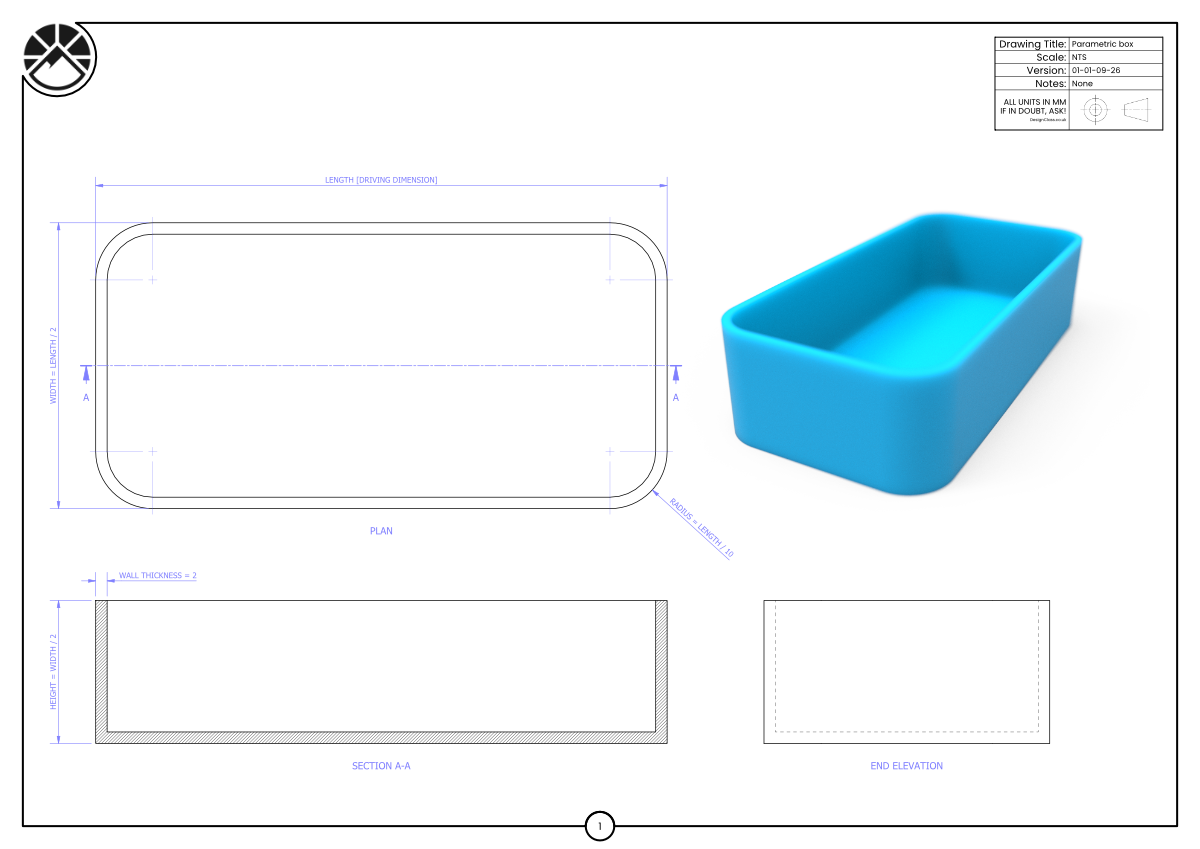
Create a parametric box using the relationships shown in the drawing. Set Length as the driving dimension, then build the sketch so all other sizes update automatically:
Width = Length ÷ 2
Height = Width ÷ 2
Wall Thickness = 2MM
Corner Radius = Length ÷ 10
Extrude the walls and base using these linked parameters, ensuring the model updates correctly when Length changes.
Learning Intentions
Use Extrude with fully parametric sketches.
Control geometry using equations and linked dimensions.
Success Criteria
Changing Length updates Width, Height, Radius and Wall Thickness.
Box extrudes cleanly with no broken constraints.
Challenge Drawing
-
Downloads you need to supplement this course.