
Extrude Challenges
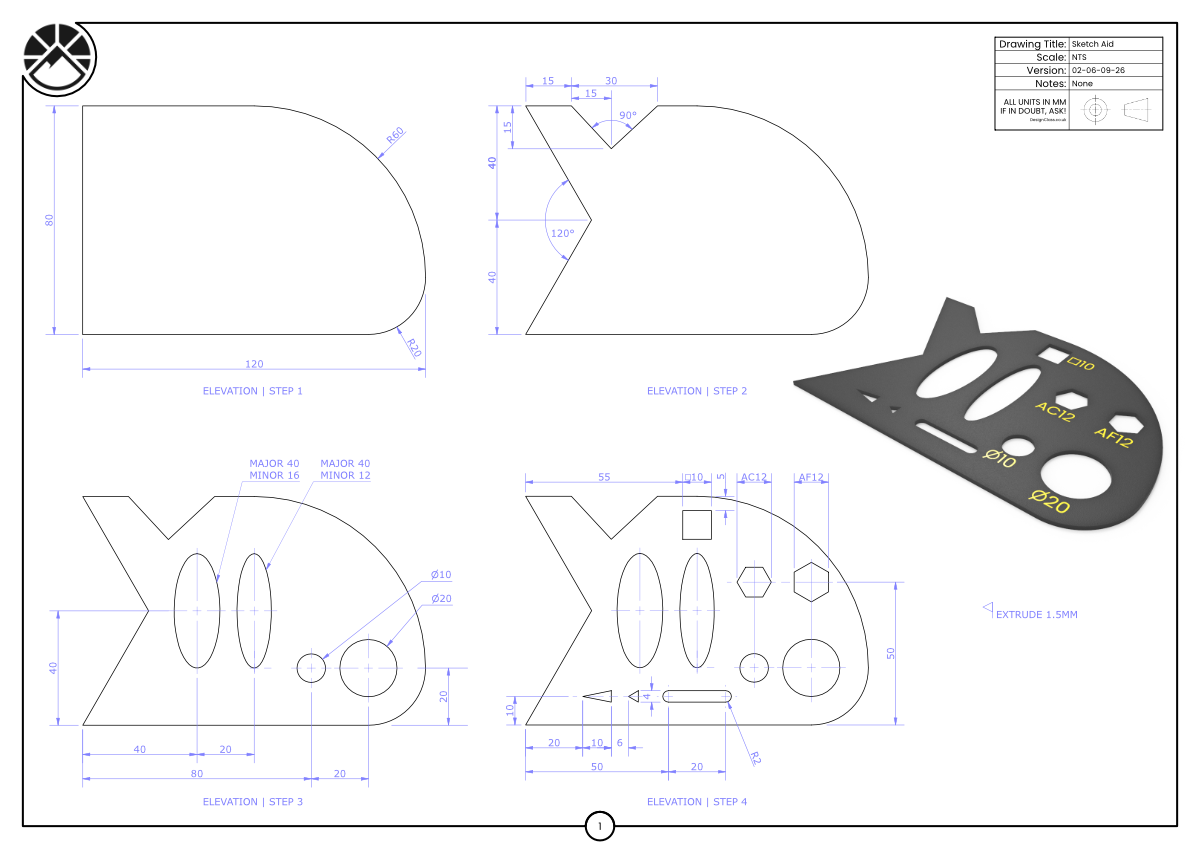
Create the Sketch Aid by following the stepped elevations provided.
Begin by sketching the base profile using the given radii (R60, R20), angles (90°, 120°) and key sizes (40, 80, 120).
Add the circular and slot features (Ø10, Ø20, AC12, AF12) before extruding the part to the specified thicknesses, including the 1.5 mm plate.
Ensure each step of the elevation is modelled accurately.
Learning Intentions
Use Extrude to create prismatic and thin features from 2D sketches.
Apply dimensions, radii and angles precisely from a technical drawing.
Success Criteria
Your final model precisely matches the drawing.
Radii, angles and hole sizes are accurate and fully constrained.
Challenge Drawing
-
Downloads you need to supplement this course.